
TOKSORTER / CHROME TOOL
Sort TikTok videos by views, likes, and more
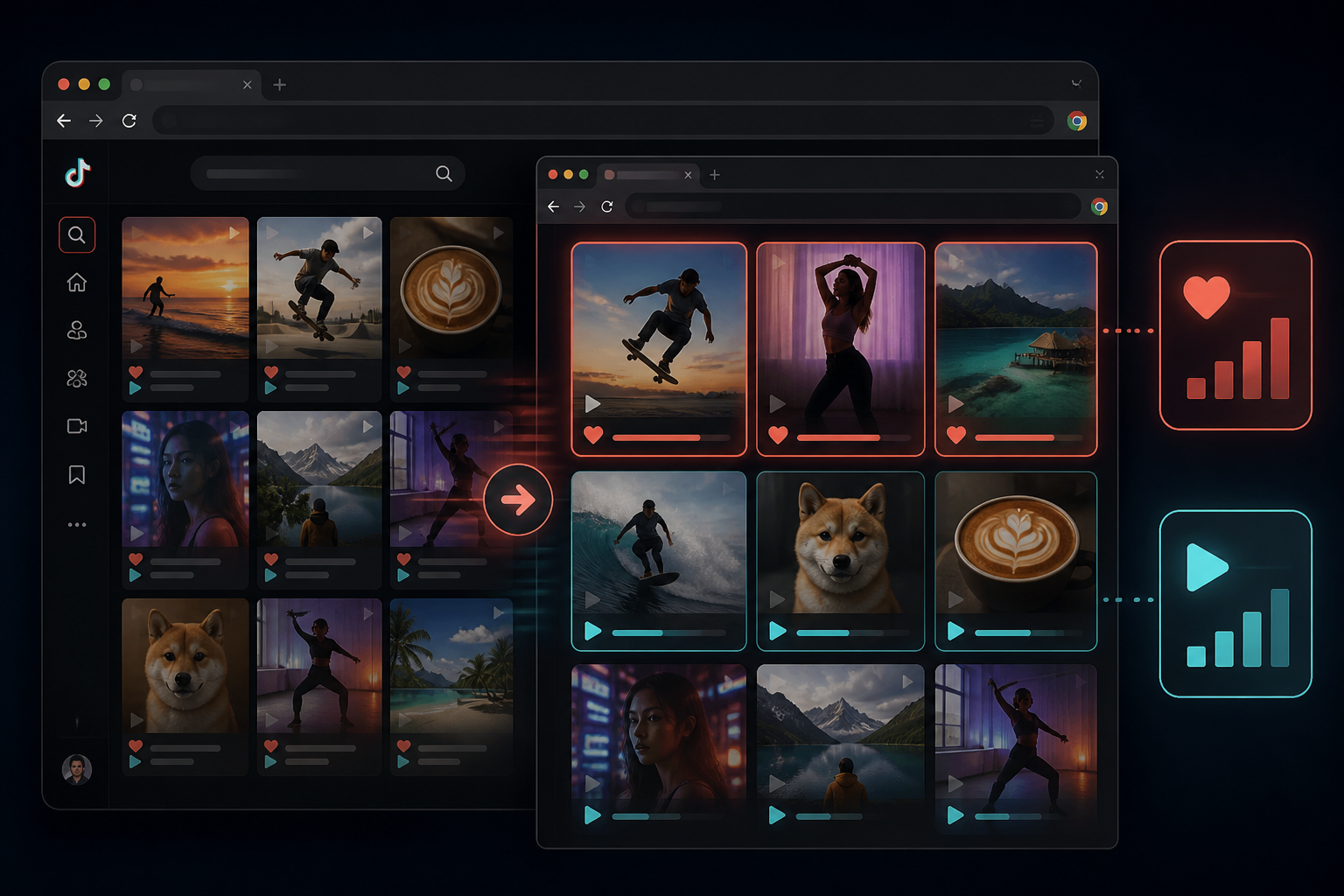
TokSorter is a Chrome extension that sorts visible TikTok videos on profile grids, search results, hashtag pages, music pages, and Explore. Pick a metric, choose high-to-low or low-to-high, and the grid updates in place.
Desktop Chrome · Opens the official Chrome Web Store

Why use a TikTok sorter in Chrome?
TikTok's web app shows feeds in default order — usually recency, not performance. TokSorter adds the sort controls desktop researchers expect.
Sort by views, likes, comments & more
Rank visible videos by views, likes, comments, shares, bookmarks, or upload date. High-to-low or low-to-high in one click.
Stats overlay on every post
See available views, likes, comments, and shares on thumbnails so you can scan the loaded grid before opening individual videos.
Export sorted sessions
Send ranked data to CSV, JSON, or Excel for client reports, creator pitches, and team collaboration.
Works on search & hashtags
Sort supported TikTok search results and hashtag pages, not just creator profiles, then inspect the high-view posts in that loaded set.
Transcribe after sorting
Sort by views, then transcribe top performers to extract hooks and scripts for content planning.
Local-first privacy
Sorting and export run in your browser. No server-side scraping of your TikTok browsing session.
See engagement stats without opening every video
TokSorter overlays available metrics directly on posts in the loaded grid. You can compare visible counts before deciding which source videos need a closer review.
For agency audits, creator review, and competitor research, pair the overlay with view sorting to identify the high-count posts within the collection boundary you defined.

Quick start: rank the visible TikTok grid
- 01
Install TokSorter from the Chrome Web Store
Add the free extension and pin it to your toolbar for one-click access on tiktok.com.
- 02
Open a supported TikTok page
Profile, search, hashtag, music, or Explore — wait for posts to load in the grid.
- 03
Scroll to load your target dataset
TokSorter sorts loaded posts. Choose a range that fits the question and apply the same boundary to every page you compare.
- 04
Pick a metric and direction
Views for reach, likes for resonance, comments for discussion, shares for virality, bookmarks for save-worthiness, date for recency.
- 05
Export or transcribe top rows
Send the sorted session to CSV or transcribe the top performers for hook analysis.
Sort TikTok search results by likes and views
Unlike the TikTok mobile app, the desktop website does not offer native sort controls on search pages. TokSorter fills that gap — load search results, scroll to expand the list, then sort by views or likes.
This workflow helps researchers, brand monitors, and content strategists select high-count examples for a keyword or topic while keeping the source result set visible.
Supported TikTok pages
TokSorter works anywhere TikTok shows a grid of public posts on desktop Chrome.
Creator profile grids
Audit a public @username profile. Sort the loaded range by views for a reach-oriented comparison or by date to review recent posting activity.
- Find the most-viewed posts in the loaded range
- Compare recent vs evergreen top performers
- Export full profile sessions to CSV
Hashtag & search pages
Compare visible examples inside a niche tag or keyword search before you create content.
- Rank a visible hashtag page by views
- Compare loaded search results by likes
- Review source videos behind the first rows
Music & Explore feeds
See which videos drive a sound trend or what Explore surfaces in your category.
- Rank sound page videos by engagement
- Compare visible posts using the same sort signal
- Download top clips after sorting
Agency & brand workflows
Shortlist creators, run competitor scans, and share ranked exports with clients.
- Consistent TikTok competitor comparisons
- Source-linked CSV and Excel exports
- Transcribe selected hooks
Sort TikTok videos by views
View sorting puts the highest visible counts first within the loaded set. Use it as a reach-oriented first pass for competitor scans, creator audits, and example discovery, then inspect publication dates, captions, opening frames, and the source videos before drawing conclusions.
Best for: Reach-oriented research, profile audits, and identifying source posts for closer review.
Sort TikTok videos by likes
Like sorting ranks by audience reaction. A video with moderate views but high likes may signal strong audience fit — useful for niche content ideas that resonate deeply even without massive reach.
Best for: Finding content that resonated strongly, engagement outlier analysis, and creator resonance checks.
Sort TikTok videos by comments
Comment sorting surfaces posts that sparked conversation — controversy, questions, tutorials that prompt replies, or community-driven content. High comments relative to views often indicate discussion-heavy formats.
Best for: Community engagement research, controversy mapping, and Q&A content discovery.
Sort TikTok videos by bookmarks
Bookmark sorting reveals save-worthy content — tutorials, recipes, tips, checklists, and reference posts viewers return to. Formats that rank high on bookmarks often make strong evergreen content.
Best for: Save-worthy format research, tutorial discovery, and evergreen content planning.
Sort TikTok videos by date
Date sorting orders posts newest-first or oldest-first. Pair with view sorting: rank by views, note dates on top rows, then re-sort by date to see if recent uploads are gaining traction.
Best for: Posting cadence analysis, recency checks, and momentum tracking on creator profiles.
TokSorter vs manual scrolling vs other sorters
| Workflow | Sort by views | Export CSV | Transcript + hashtag tools | Local privacy |
|---|---|---|---|---|
| Manual scroll on TikTok.com | ✗ | ✗ | ✗ | ✓ |
| Paste-only downloader sites | ✗ | ✗ | ✗ | Varies |
| TokSorter Chrome extension | ✓ | ✓ | ✓ | ✓ |
Research workflows that start with sorting
Apply a defined collection boundary, then choose the metric that matches the decision.
Audit a creator's most-viewed posts
Open a public creator profile, load the range you intend to review, and sort it by views from high to low. Use the first rows to select source videos for hook, format, topic, and publication-date analysis.
Compare performance inside a hashtag page
Open a relevant hashtag page, record the review date, load a defined range, and sort by views. Compare formats only after opening the source posts, then export the session if another reviewer needs to verify the examples.
Run a repeatable competitor review
Use the same loaded range and collection date for each public account. Sort by views, preserve source URLs, then re-sort by another signal when the research question calls for a different comparison.
Build a documented reference set
Rank a visible profile or hashtag page, review the posts, and save only supported media you have the right to keep. Export the matching source URLs so a creative brief retains its context.
Install TokSorter — free TikTok feed sorter for Chrome
Sort by views, likes, comments, shares, bookmarks, or date. Export to CSV, transcribe hooks, and download — all on tiktok.com.
Frequently Asked Questions
- Can TokSorter sort TikTok videos by views?
- Yes. On supported TikTok pages in desktop Chrome, choose Views and high-to-low or low-to-high. TokSorter reorders every post currently loaded in your browser — no API key or TikTok login required.
- Does it work on TikTok search results?
- Yes. Open a TikTok search or video search page, scroll to load results, and use the sort toolbar. Scroll further to expand the dataset, then sort again for a complete ranking of visible videos.
- Which TikTok pages are supported?
- Profile grids, search and video search, hashtag pages, music/sound pages, and Explore. The TokSorter toolbar appears automatically when posts load on tiktok.com.
- Do I need a TikTok account to sort videos?
- No. TokSorter reads publicly visible content on the page you have open. You do not need to log in for core sorting, stats overlay, or export features.
- Can I export sorted TikTok data to CSV?
- Yes. After sorting, export the session to CSV, JSON, or Excel with views, likes, comments, shares, bookmarks, upload dates, captions, and author info.
- How is TokSorter different from manual scrolling?
- Manual scrolling leaves posts in TikTok's current page order. TokSorter reorders the posts already loaded in the tab, making it easier to compare visible metrics, dates, captions, and source videos without treating the result as TikTok's complete dataset.
- Can I sort TikTok by engagement rate?
- Sort by likes, comments, or shares as proxies for engagement. Many researchers sort by views first for reach, then re-sort by likes to find resonance outliers.
- Does sorting work on hashtag pages?
- Yes. Open a public hashtag page, scroll until the range you want to compare is loaded, and sort that visible set by views, likes, comments, shares, bookmarks, or date. Record the collection date and range when using the result for trend or niche research.
- Is TokSorter a TikTok feed sorter Chrome extension?
- Yes. TokSorter is a Chrome extension built specifically for sorting visible TikTok feeds on desktop. Install from the Chrome Web Store and pin it to your toolbar.
- Is my browsing data sent to a server?
- Core sorting, stats, exports, and downloads run locally in your browser. TokSorter only connects online if you sign in or start an optional cloud task.